

Welcome to Klubs!
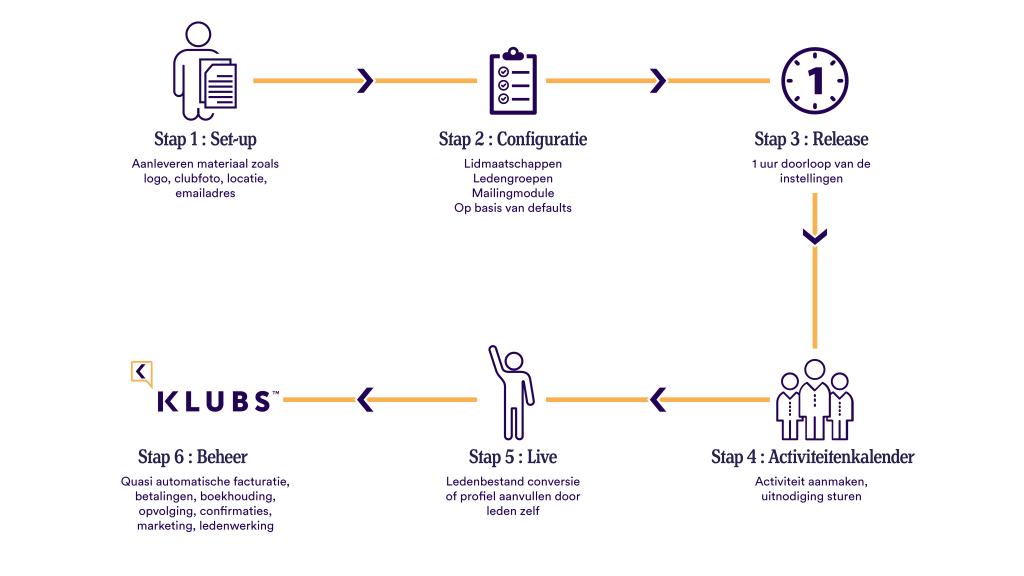
Strengthen your Association, with our membership platform. To get off to a smooth start, we recommend following these steps:
We have also already given your profile admin rights.
Login with your mail address at https://wista.klubs.be/activate
- Go through the Implementation Wizard
If necessary, collect basic setup info in advance. - Going through the Club Configuration (2nd part page)
- Add members to your Member List - Member Onboarding
- Contact Klubs for a walk-through of your settings
- Start creating Activities
- Send a welcome
E-mail campaign - see mailing New Member Platform - Clubs - Install the Mobile App and take Klubs with you wherever you go
Be sure to explore the full Klubs Support, the knowledge center. The support center can also be found on the platform by clicking on the support icon ⦻ in the upper right corner.
Support
After creating your Klubs environment, the club configuration and creating the first members and activities, we offer you subsequent, online, support from Klubs:
- Release: an online review of club settings - 1/2 hour
- Post go-live: with possible questions, via email, possibly online - 1/2 hour
Primary Institutions
Below are the primary settings. These should be determined in advance because they have a major impact on the settings or cannot be changed later.
- Club information - Domain name for Clubs, Application URL
url of your Clubs platform - do not change it - Communications - Mail address for shipment
Important is the management of the shipping address, as this determines to a large extent the degree of delivery - Mail Set-up - Integrations - Mailgun
The Klubs email delivery service - do not change these settings - Modules - Memberships
Choosing to work with memberships should be taken deliberately. Modification thereafter should be done with the utmost caution.
Settings
All the settings are listed together and it is best to go through them in order.

- Club Information
- Interface
- Communications
- E-Mail Texts
- Billing
- Integrations
- Registration procedure
- Menus
- Modules
- Advanced options
Club Information
With following points of interest:
- Association website
This is the link at the bottom of the club platform for the Ⓒ credentials - Application URL
url of your Klubs platform - Company information
We use this information for your automatic privacy statement and to prepare invoices from KLUBS to your members as needed. - Default Location
Default location for your activities. Used as default, but can be changed subsequently for each activity. - General Conditions
Are at the Registration, per activity.
Interface
With following points of interest:
- For this, possibly, together with a graphic artist, collect your marketing material in advance in the proposed format - Set-up basic info
Communications
With following points of interest:
- Mail address for shipment
Important is the management of the shipping address, as it determines to a large extent the degree of delivery - Mail Set-up - Marketing Collateral
For this, if necessary, work with a graphic artist to collect your marketing materials in advance in the proposed format - Set-up basic info - Email Footer
Rather to be used for Sponsor visibility, or along with a link to the sponsor's website.
An overview document around Sponsorship.
E-Mail Texts
Some 25 default email texts used throughout the platform for member communications.
- Email texts
With following points of interest:
- Subject personalization
Possible with the placeholders - #firstname #lastname - Text personalization
Possible with different placeholders - see button "personalization & legend"
Billing
A general overview in terms of Accounting and Administration in this overview document
- Clubs - Accounting & Administration
With following points of interest:
- Financial Succession
A set-up guide to Financial Succession - VAT Settings
Best to review with your accountant - Clubs - Accounting & Administration - Interface with external software
The set-up for Accounting integration
Integrations
With following points of interest:
- Mailchimp
For transferring your Member information to Mailchimp - Mailgun
For sending emails (transaction emails and mail campaigns), Klubs uses an email delivery service - do not change these settings - Mollie
Setup of Online Payments
Registration procedure
With following points of interest:
- Onboarding
- Registration Additional Fields
Setup Profile - Meta Fields - Membership Types
What membership types available during registration - Member Import - Member Import
Based on an xls or csv file with basic member info
Menus
With following points of interest:
- User environment
Setup of the external Menus
Modules
With following points of interest:
- Memberships
Choice to work with memberships should be made deliberately.
Modification thereafter should be done with the utmost caution.
Advanced Options
General Club Settings
- Corporate Membership Management
Managing Memberships at the Corporate Level. - Financial Tracking
Specific procedures and lists for Financial Tracking within Clubs. - Waiting lists
Tracking enrollments using Waiting lists - Invitation Buttons
Determining which buttons appear for the RSVP - Enrollment Procedure
Where then one might skip the general information and land directly on the enrollment form (for members with advanced knowledge or intensive use of Clubs)
Club Configuration
Following configuration elements should best be determined, prior to adding members, memberships or activities.
Membership Types
Configuring membership types
- Administration / Memberships - Managing membership types
Member groups
Configuration of member groups, this can then be directly included in the onboarding.
- Administration / Member management - Add member group
Profile - Meta fields
Configuring Profile - Meta fields
- Administration / Member Management - Additional Fields
Corporate Member Management
Managing Memberships at Corporate Level
- Settings / Advanced Options - Member Management
Activities
Configuration of Activity Types
- Administration/Activities - Manage activity type.