Below topic also in a tech Long Read, possibly to be forwarded to IT responsible or interested members - Clubs Efficient Email Communication
Undelivered mails
For sending the mails from Klubs we work with a transactional mail system. For this we also have a specific Mail set-up. This separate service guarantees a high delivery. Additionally, all mails are personalized with deposit codes (#firstname), especially the subject, to increase this delivery even more. The non-arrival of mails has nothing/not much to do with the sender, more with the spam settings at the receiver.
Part of the problem lies with the recipient Outlook, Hotmail, almost all Microsoft mail accounts, have a very high spam sensitivity. In addition, there is also the issue of control at company accounts or Providers with specific Anti-Spam filters.
Here is some background info around various mail delivery issues:
For resolution of Mail Delivery issues some suggestions:
Safe Sender sets the default klubs mail address (see received mail) as safe sender
Clubs in Contacts sets the default clubs mail address (see received mail) as safe sender
Check Spam mailbox designates mail as Safe Sender
Admin Solutions
A separate support topic around Mail Delivery, then specifically for Admins. - Mail Delivery Admin
Clubs support
Furthermore, a number of support tools were built into the platform within Klubs.
Login info
From each member's detail profile, new login details can be sent by email. - Send new login details by email to ...
After sending this mail, the activation link will also appear. This can then be sent separately from the personal mail or via WhatsApp. Probably with a higher delivery.
Email Tracking
Furthermore, there is extensive e-mail tracking to check whether the (undelivered) mail was actually sent. For example check whether the member in question was also in the member group or mailing selection. - Support - Email tracking
E-mail copy
For specific mails (membership renewal, ...) an additional mail address can also be added. These mails can then be resent from this CC mailbox.
Through the menu button - Membership Renewal - there is also the possibility to renew multiple memberships at the same time and based on by type, date or other parameters. This is done in 4 steps
Selection - of memberships to be renewed
Parameters - defining the parameters of the new memberships
Communication - layout of mail around this renewal
Confirmation - overview for the effective extension
Especially when renewing memberships but also throughout the year you as an admin get the question about forgotten passwords. For this a renew functionality is provided on the member profile - User account / Login data
Unless permitted, see Privacy Statement, and appropriate "consent," there is a restriction regarding the transfer of contact information between members.
Settings
Module
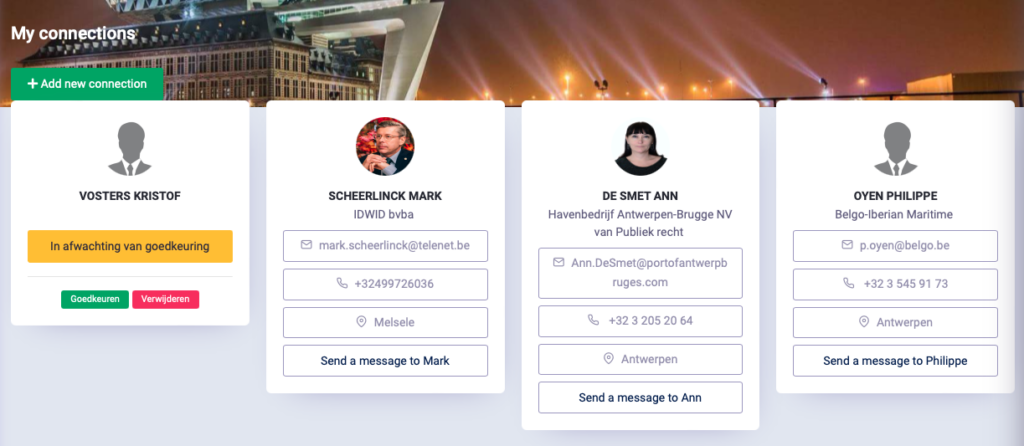
That is why there is the specific module - Connections.
To use Connections, this module must first be activated in the Settings.
The Connections module allows your club to help members connect with each other in a way that is fully GDPR-compliant. Emails are not sent directly from the sender to the contact; instead, they are sent through the club.
Club mail to addressee asking to connect
Approval (consent) for this connection
Visibility of contact information (mail, phone no., etc.)
This connection ability is there specifically on attendance list of activities to then possibly look up and connect with a member after the activity. No more need to exchange business cards.
E-mail texts
Different e-mail texts are used within the Connection module.
These are already set up by default, but optimally they can be reviewed, or adapted, specifically for your club.
Menu - Connections
In the specific menu - Connections, members can create new connections or consult or manage existing ones.
These connections are done GDPR compliant. No mail is sent from the sender directly to the connection, but this is done through the club.
The functionalities speak for themselves
New connection - make new connection
Approve - allow (or deny) a new connection
Messages - sending a direct message to your connection
Activities - Connection
The connection option is there specifically on attendance list of activities to then possibly look up a member after the activity and connect. No more need to exchange business cards.
All necessary measures within GDPR are standard built into Klubs. Some of these measures:
Consent or explicit and informed consent for all stored data
Protection of member data in a secure environment
Security of data to the best of our ability against loss, theft, unauthorized access and modification by non-users
Outsourcing to third parties (including hosting, transactional mailing, IT infrastructure) to professional parties with excellent references and guarantees regarding data protection
Encrypted storage of passwords, of course not accessible by club administrators
Limiting access to sensitive information to authorized persons
Clubs are audited annually by a Data Processing Officer
The possibility to remain anonymous within the association (personal data not in the membership list), anonymous registration for activities
Opt-out of all electronic mailings
Clear procedures (limitation of authorized persons) when uploading images
Forget-me procedure, partly dependent on the club manager
Ability to submit an inquiry request containing all data we have collected about a member.
Developed in Corona time, but certainly reusable, is a complete platform for setting up and legally holding a General Assembly. This Add-on may still need to be specifically set up each time per club.
A complete system, of course GDPR compliant and already tested several times and with audit by a bailiff. With following functionalities:
Pre-registration, verification of voting rights
Management of proxies
Manage calendar and documentation
Voting Form
Administration and monitoring of voting procedure
Screenshots - examples
Personal Login
Agenda and Documentation
Voting Form
Administration and follow-up
With a separate login for supervision and officialization by a bailiff, then available to the board only later.
In addition to the regular settings, which are organized by functional module, there is now an Advanced Options section. The advanced options are of two types:
Settings that can be changed after startup ; Certain advanced configurations can be adjusted after the initial installation.
Settings that can be optimally set during setup ; These fundamental settings need to be configured during setup, such as: Manners, Attendance Register and Time Registration during activities and certainly the Multi-club setup.
For this fundamental setting we strongly recommend that you contact support@klubs.be for a correct configuration.
We would like to go through the most useful settings:
Member Management
Member Profile - Modular View
Member profile management from simple (Personal info) to complete (additional Company info, Expertise, Invoicing)
Manners
Most clubs have sufficient personal data on the profile, stating First Name and Last Name. However, some associations, particularly those with a significant number of members with noble names, prefer a more formal approach. This is also common in the Netherlands, where names are written differently or alphabetized by the main name, for example: Noordwijk, van den.
Formal: Prefix, First Name, Middle Name, Name (Titre, Prénom, Particule, Nom)
The member profile integrates formal etiquette into the display of member information. The address is made with the full name (and title), but listing is only done on the main component of the surname
Corporate Member Management
In some associations, or rather federations, membership management is not individual, but rather on a corporate level - Corporate Membership Management.
Names Display
Display of names in the various membership lists:
First name Name
First name
Financial follow-up
Financial monitoring within Clubs, then specifically for associations without accounting integration. This then mainly through the separate reporting - Financial Monitoring.
RSVP Buttons – “Yes – Maybe – No” Manage the available buttons on the invitation
Subscriptions - Flow
Registrations – Configuration tailored to your members' platform experience Via general page or directly to the registration form
The latter setting skips the general details page for the activity, taking one directly to the registration form. This simplifies the procedure and avoids the mistake of members thinking they are registered after clicking the buttons in the emails.
Registrations The status of registrations, cancellations, waiting list
Presence – Handy attendance list to use during the activity – With Mobile view and attendance slider – Time recording option (timing selection setting)
Billing Full billing interface with totals for Members and Guests
Club set-up
Multi-Club structure
This is one of those settings that needs to be set correctly right from the start. Then as a Multi-cub or Umbrella Association
Name
Possibility to name the specific departments as department, tribe, region, …
Most of the communication with members is by mail, still the most efficient and fastest means of communication. Within Klubs, we use the Pull principle. For every action a member has to perform, he is pulled to the platform, so to speak.
Below is an overview of email texts and the indication of where they are used. - Overview email texts
Member Management
Registration - mail to member
Registration procedure mail after registering a new member
Registration - mail to club administrator
Registration procedure mail to administrator (for info, for approval) after registration of new member
Registration - mail with approval to member
Registration procedure mail to member, after approval by admin
Password forgotten
Login screen - Forgot password mail at login screen - forgot password
Confirmation password changed
Procedure - Forgot password mail confirmation after password change
Activities
Invitation
Activity Admin / Communications mail inviting activity to (selection) members or prospects
Registration activity - Subscriber
Activity user / Registration mail after registration activity - to member registrant
Registration activity - Guest
Activity user / Registration guest mail after registration activity - to guest registrant
Registration activity - Waiting List Member
Activity user / Waitlist enrollment(Waitlist management) mail after registering activity on waitlist - to member or guest
Registration via admin - Member
Activity admin / List Attendees - +Member mail after registration activity by Admin - to member
Registration via admin - Guest
Activity admin / List Attendees - +Guest mail after registration activity by Admin - to invitee
Share invitation activity
Activity user / Share activity mail with information activity after invitation by member
Activity - Confirmation
Activity Admin / Communications mail for Confirmation activity - to target group selection
Unsubscribe activity
Activity user / Unsubscribe mail after unsubscribing activity - to member registrant
With here 2 versions depending if the Unsubscription happens outside or inside the Cancellation Period. This to then for a separate handling or a specific notification in terms of charging costs.
Communication - Thanksgiving
Activity Admin / Communications mail for Thank You activity - to target group selection
Communication - Evaluation
Activity Admin / Communications mail for Evaluation activity - to target group selection
Administration
Membership renewal
Memberships - Renew(Membership Renewals) Mail upon membership renewal and forward to accounting.
As an Association, personal data is managed and processed. This creates the who processes accountability. Drawing up a processor agreement is part of this. The Association is responsible for the data and is the controller in this. Klubs processes personal data on behalf of the controller and is the processor (processor) in this.
The processor agreement is the agreement between controller and processor that defines how the processor should handle personal data. The controller who has personal data processed by a processor is obliged to have a processor agreement with the processor.
This applies even if the processor is, for example, a subsidiary of the responsible company, or is located abroad. Anytime a controller "outsources" the processing of personal data, a written agreement is required.
Klubs BV, established at Fortveld 2 b14, 2110 Antwerp, registered under KBO number BE 0751.959.935, legally represented here by Jan Renaer, director.
Hereinafter referred to as "Clubs"
Wherein the foregoing parties together are also referred to as the "Parties" or, individually, are referred to as a "Party."
Be observed that which follows:
The parties have entered into an Agreement around the use of the Klubs Software Platform. Additionally, they wish to enter into a Processing Agreement in the context of the GDPR and privacy legislation.These attachments form an inseparable part of this Agreement. Any deviations set forth in the Agreement take precedence over the information contained in the attachments.
Third Parties
Document Data
Third Parties
Web hosting
Combell
IT infrastructure
Pandafish
Transaction mails
Mailgun
Mailings
MailChimp
Accounting - Single-entry bookkeeping scheme
Treasurer
Accounting - Full accounting schedule
Yuki
Online Payments
Mollie
Privacy Statement
Klubs' Processors Statement
Klubs is committed to protecting personal data and respecting privacy.
In this processor statement, we want to provide clear and transparent information about what data is collected within Klubs and how Klubs handles personal data. Klubs makes every effort to ensure privacy and therefore handles personal data with care. Klubs adheres in all cases to the applicable laws and regulations, including the General Data Protection Regulation (AVG) or Global Data Protection Regulation (GDPR).
This entails:
personal data are processed in accordance with the purposes for which they were provided. These purposes and types of personal data are described in this privacy statement.
the processing of personal data is limited to only those data that are minimally necessary for the purposes for which they are processed
Express consent is sought if Klubs requires it for processing personal data
appropriate technical and organizational measures are taken to ensure the security of personal data
no personal data will be passed on to other parties unless necessary to carry out the purposes for which they were provided
Purpose of processing
Personal data is held and processed by Klubs for the following purposes and legal grounds :
For conducting efficient club management and in particular membership administration
For the organization and management of activities
For sending transaction emails and mailings
For the above purposes, Klubs may manage and process the following personal data:
Personal identity information : name, first name, address, phone number, e-mail, photo, relationships with other members
Identity data: identity card number, national register number
Personal characteristics: gender, date of birth, place of birth, nationality
Business data: company, function, address, VAT no.
Characteristics in relation to specific areas of interest
Klubs uses the data collected only for the purposes for which it obtained the data.
Provision to third parties
The data transmitted to us for processing may be provided to third parties as necessary to carry out the purposes described above.
For example, we use a third party for:
taking care of membership records
Taking care of the internet environment (web hosting)
Providing IT infrastructure (including IT network, software, app, etc.)
Klubs never transfers personal data to other parties with whom we have not entered into a processing agreement.
Klubs makes the necessary arrangements with these parties (processors) to ensure the security of personal data.
Secrecy
Klubs will not disclose or share the data provided to third parties unless required and permitted by law. For example, data requested by the Police as part of an investigation.
Also, Klubs may share personal data with third parties if the Association gives us permission (in writing) to do so. The Association has the right to withdraw this consent at any time, without prejudice to the lawfulness of the processing before its withdrawal.
Klubs does not provide personal data to parties located outside the EU.
Personal data of minors (persons under 16 years of age) are processed if written consent is given by the parent or legal representative.
Data security
Klubs has taken appropriate technical and organizational measures to protect personal data from unlawful processing. For example, Klubs has taken the following measures;
all persons who may learn of your information on behalf of Klubs are bound to secrecy thereof
all our systems have a username and password policy
when warranted, personal data is pseudonymized and there is data encryption
backups of personal data in order to restore them in case of physical or technical incidents
Procedures for regular testing and evaluation of these measures
employees are informed of the importance of protecting personal data.
Retention period
Klubs does not retain personal data longer than necessary for the purpose for which it was provided or required by law.
rights regarding your Personal Data
Persons whose data are processed by Klubs have the right to inspect and the right to correct or delete personal data.
To this end, separate GDPR reporting is provided. Within the Klubs tool, the conceived personal data can be displayed and reported in a simple way. A transaction for the right to be forgotten is also provided here.
Contact is always made through the Association. To verify identity, this is done on the basis of a copy of the identity card.
Memberships may expire throughout the year. This is because memberships can start throughout the year. But also since memberships can have varying periods.
But it is especially the financial aspect of these renovations that makes this issue worthy of attention. And this is where Klubs can help:
Management - overview of memberships with status indication
Renewal individual, per member
Renewal multiple memberships based on parameters
Processing
Management
Basic here is the list - Memberships, with indication if a membership is about to expire or has already expired.
Overview
One task is to regularly review this list of to-do's based on the indications:
[Renew - blue button]: indication - expires soon (3 month)
[Renew - red button]: has already expired
Renewal Individual
A click on the Renew button renews membership.
This renewal can be changed in terms of type (depending on age or other indication) and also in terms of end date. Furthermore, some financial and communication indications.
If the Membership is not renewed, the member will get the status - Expired. For this, see also super topic around Member Status.
Financial follow-up
It is also maintained in this list: Invoicing and Payment. If necessary, an invoice is prepared and forwarded to the specific Accounting department. Further info around financial follow-up within Clubs of Memberships. - support topic Financial Processing and Financial Procedure
Mail Communications
A mail is sent at each renewal, see example above. Mail layout to be changed at settings.
Renewal of multiple memberships
Through the menu button - Renew Memberships - there is also the possibility to renew multiple memberships at the same time and based on by type, date or other parameters. This is done in 4 steps
Selection - of memberships to be renewed
Parameters - defining the parameters of the new memberships
Communication - layout of mail around this renewal
Confirmation - overview for the effective extension
Selection
The first step is the selection of memberships to be renewed. This selection of similar memberships is necessary, since in this procedure several memberships are renewed, then all with the same parameters in terms of type (amount) and period.
Membership type
Due date
Further refinement can be done here via the individual tickmarks.
Parameters
Parameters are set here for all selected Memberships:
Membership type
End date: specific entries (Fixed) or automatic calculation based on membership type (Variable).
Cost: specific entries (Fixed) or automatic calculation based on membership type (Variable).
Communications
Manage communication of this renewal with indication to send mail, or to change the default mail.
The default mail is taken from the Settings - Email texts. (Email texts / Administration / Membership renewal)
Confirmation
In the last step, an overview for the effective extension with indication of the different parameters chosen.
Processing
Following is the further processing of these renewals.
Communications
With each renewal, an email is sent to the member with info about this renewal.
The default mail is taken from the Settings - Email texts. (Email texts / Administration / Membership renewal)
Status
Each member can track their status through their profile: Memberships. or - https://demo.klubs.be/mymembership (where demo should be replaced with your Klubs domain name)
Online Payment
When choosing online payment, there is the option to pay online via the button on the Membership screen. After payment is made, the payment indication is set to paid.
Accounting
If an accounting package is used, a draft invoice is created via the interface at each renewal. After review, this can then be finally created and sent from the accounting software.
Follow-up is done here within the accounting department by following up on invoices to be received, or sending the late ones a, automated, reminder.
Failure to pay membership invoice, any credit note, and removal of member by changing Member status to expired.
At a number of clubs, the membership period runs until the end of the working year (31 December). But the renewals are only created in the new working year (for a correct accounting date).
This means that the members will no longer have access to the platform the day after the end of their membership, i.e. in the new working year.
Grace Period
Therefore, a Grace Period setting was added at the club level. This still allows members to access the platform during this interim period until membership renewals were implemented by the admin.