

As a platform, Klubs is GDPR Compliant.
Unless permitted, see Privacy Statement, and appropriate "consent," there is a restriction regarding the transfer of contact information between members.
Settings
Module
That is why there is the specific module - Connections.

To use Connections, this module must first be activated in the Settings.
The Connections module allows your club to help members connect with each other in a way that is fully GDPR-compliant.
Emails are not sent directly from the sender to the contact; instead, they are sent through the club.
- Club mail to addressee asking to connect
- Approval (consent) for this connection
- Visibility of contact information (mail, phone no., etc.)
This connection ability is there specifically on attendance list of activities to then possibly look up and connect with a member after the activity. No more need to exchange business cards.
E-mail texts
Different e-mail texts are used within the Connection module.

These are already set up by default, but optimally they can be reviewed, or adapted, specifically for your club.
Menu - Connections
In the specific menu - Connections, members can create new connections or consult or manage existing ones.
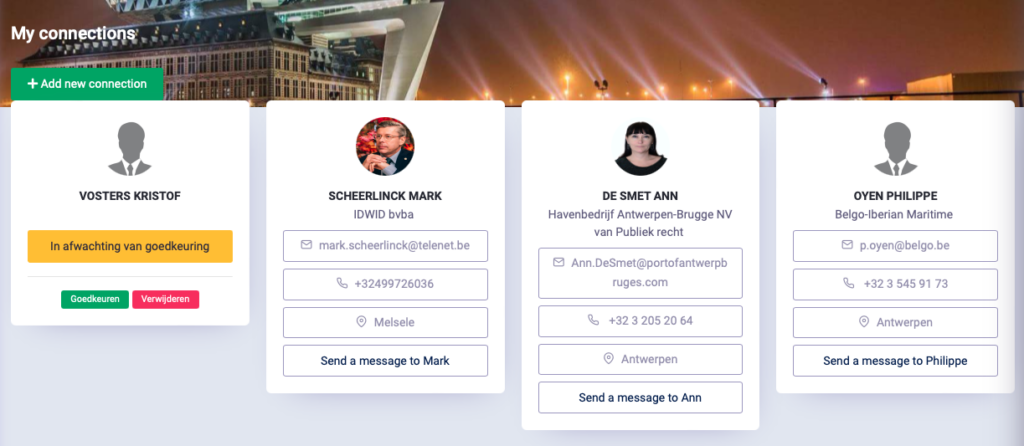
These connections are done GDPR compliant.
No mail is sent from the sender directly to the connection, but this is done through the club.
The functionalities speak for themselves
- New connection - make new connection
- Approve - allow (or deny) a new connection
- Messages - sending a direct message to your connection
Activities - Connection
The connection option is there specifically on attendance list of activities to then possibly look up a member after the activity and connect. No more need to exchange business cards.
