clubs_support

Text Editor

Within Klubs we use a text editor for inserting text, images and especially for formatting.

See the bottom of this Knowledge Item for the specific HTML Format option.

Text Format

Features

The editor includes the following functions, some specific ones of which we will discuss in further detail:

Heading- Bold - Italic - Underline - Striketrough - Font size - Text color - Ordered list - Unordered list (bullets) - Block Quote - Table - Link - Image - Horizontal line - Indent - Outdent - Alignment - -HTML

Text Copy

Optimal is to just type and format text. Copying text, for example from a word document or a website can also be done, but can cause problems.
This copied text usually contains control characters that can sometimes be misinterpreted in the editor and cause special effects.

Copied text is best formatted as clean text first, without the possible control characters.

  • via clean copy in the editor: Ctrl+Shift+V (PC) or Command+Option+Shift+V (Mac)
  • via Notepad (PC) and then Paste and Match Style
  • via TextEdit (Mac) and then Paste and Match Style
  • via an online tool - http://www.textcleanr.com

Table ⊞

Formatting a usable table in an editor requires some knowledge of html.

For this we refer to a good tutorial - https://www.w3schools.com/html/html_tables.asp

Link 🔗

A link allows you to link external links in your text.

Links from your text to websites or to a mail address (this then opens in the user's default mail application.
This formatting can be made simple or complex, as with the mail, automatically a subject a body text a cc address, ... But also here some knowledge of html is needed. We refer here to:

Image 🏔

Adding an image is done through the editor - Insert Image.
Through Upload Image you can retrieve an image from your desktop and insert it.

Image With
Image With for mailings to edit to 600 pixels
Click on the image to display the Image Edit.

  • All images are loaded in full size
  • Through the Image edit you can change the dimensions
  • Optimal for mailings - With 600
    (the height then changes accordingly)

Image Resolution
Image Resolution for mailings editable to 72 dpi
A simple image tool is probably needed for this.

Horizontal Line -

This is a simple, but convenient formatting to split a text smoothly

HTML editor 🛡

Within the text editor, this button allows you to perform a basic HTML review directly in the editor.

For a basic understanding of HTML – w3school.

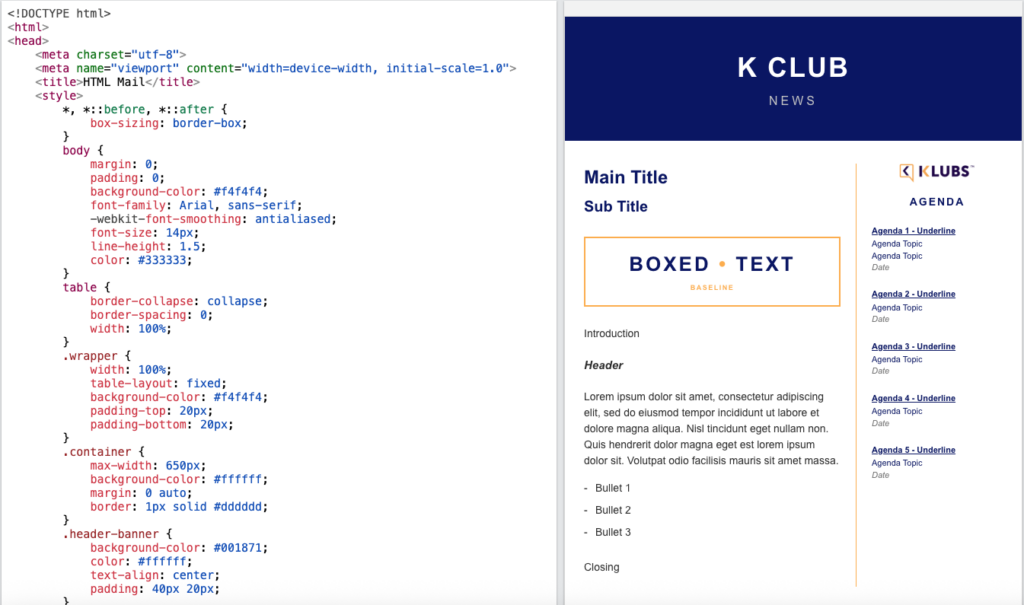
HTML Format

Optionally, you can format an email entirely in HTML.

With expanded design options, such as visual identity and branding, improved structure and layout, higher conversion rates,

Tools that can help you with this:

  • Litmus
  • AI: Claude, Gemini, ChatGPT

However, caution is advised. If an HTML email is not formatted correctly, there is a risk that it will end up in the spam folder or appear unreadable to the recipient:

  • Spam
    Email providers (such as Gmail, Outlook, and Yahoo) strictly scan HTML code.
  • The Image-to-Text Ratio
    Not just one large image with text hidden behind it
  • Bad code = Spam
    Sloppy HTML and broken tags immediately trigger the spam filters
  • MS Word copy
    Copying code directly from Microsoft Word = spam
  • Gmail – Outlook
    What looks great in Gmail can fall apart completely in the recipient’s Outlook client
  • 1999-style code
    Code as if it were 1999: tables, inline CSS, …
  • Plain text version
    Always include an automatic plain text version with your HTML campaign

  • Testing Send test emails to various devices (iPhone, Android) and email clients (Outlook, Gmail).

Read more

Spaces

Some of our affiliated clubs have a permanent location.
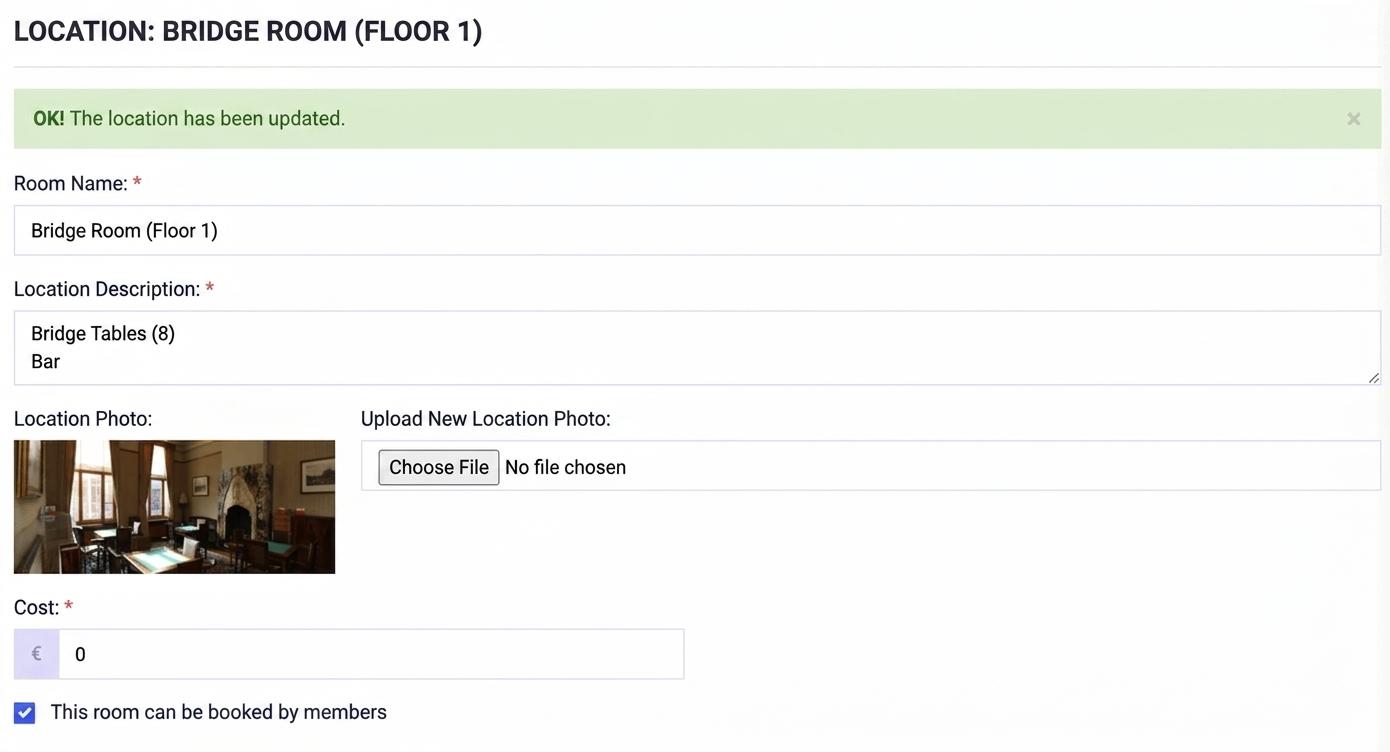
Locations takes care of the follow-up of reservations of the various salons, complete with follow-up, allocation and link to the invoicing of members/other users.

Setup

Set-up is done via a fill-in screen on the computer

Ability to identify the different Salons and record the full description.

Use

Reservation of the locations stating date and timing, pricing, and preference regarding salon.

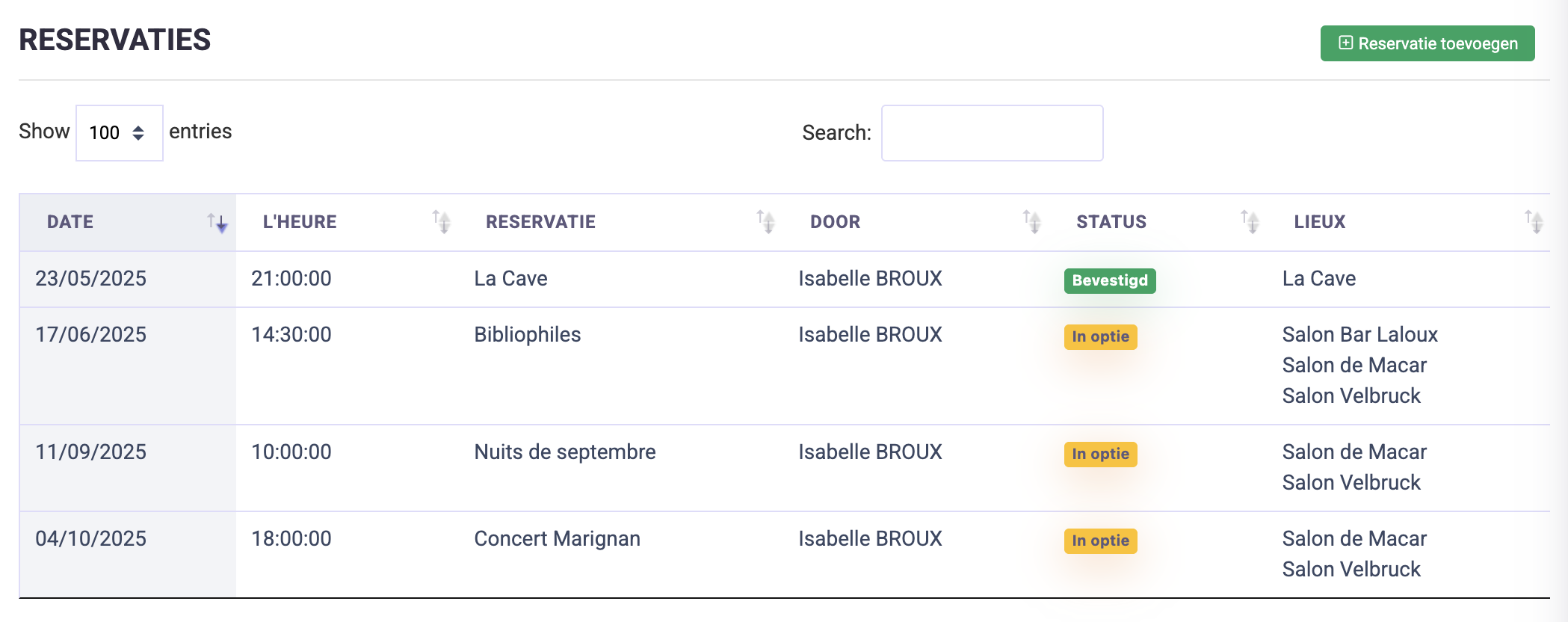
Reservation overview

A complete overview of reservations with indication of status and necessary actions.

Activities Reservations

These external reservations naturally also include the lounges used for club activities.
Here you can indicate the spaces used for each activity.

Calendar overview

Calendar with overview of all locations and their usage status, by both Activities and Location Reservations (in different color codes).

Read more

Release note - Activity Planning

For an activity you can now also set a "published from" date and "register from" date. This way you can prepare future activities, indicate when they can be viewed by your members and when they can register. Even more flexibility for you as club administrator.

With now separate settings for

  • Publication date
  • Enrollment date - from
  • Enrollment date - until
  • Cancellation deadline

Klubs Support - https://support.klubs.be/knowledge-base/activiteiten-planning/

Read more

Release note - Member management I

In this release note a simple topic, but very useful, especially to help your members

  • Profile photo

The profile picture appears at the top of the profile. And can also be edited there by members.

  • Click on the name of a member
  • Then click on the icon 👤 in the upper left corner
  • In the popup that appears, choose a photo on your computer and save

The same photo also appears to the left of the name in all member lists.
Useful for getting to know your members better.

Klubs Support - https://support.klubs.be/knowledge-base/profiel-foto/

Read more

Use restrictions

Pricing

In terms of pricing 2 posts:

Startup costs:

Between 500 and 3,000 euros

Estimate, depending on customized trajectory
With following extremes

  • Small: setting up the platform, klubs domain name, release and post go live support;
  • Extensive: complete conversion of existing member database (including variable fields and even profile photos), set-up of integrations (accounting, mail tools, ...), extensive support;

License

1 euro per member per month

Where the number of members is recorded as the highest number of members within the administration within the specified period.

Use limitation - Prospects

Klubs is a Membership platform.
Registered members have a login, can register themselves for activities, as well as register guests, connect with other members, view their contact info, in other words use their Membership.

There is also the possibility to keep prospects within Klubs, this to further build your club. Prospect lists can be used in the Mail Campaigns, for sending the activity calendar or member recruitment.
Since prospects do not have a login they cannot subscribe themselves. This can be done after reply to a mail campaign, then by the secretary, through the admin functions.

Prospects - number

During the first year, the number of prospects is unlimited.
Starting from the 2nd year, the number of prospects is limited to the number of then registered members.

.

Use restrictions - Contract

Klubs is primarily a membership platform with the ability to hold prospects. However Prospect lists are supplementary, and cannot be used as membership-replacement, e.g. for extensive mail campaigns or activity subscriptions.
Therefore usage restriction for Prospects and Public subscriptions, this due to the additional cost for data storage and especially additional mailing costs.

Prospects

If the number of prospects substantially exceeds the number of members, Klubs reserves the right to charge additional license fees (maximum €1.00 per additional prospect per month) here.

Public Enrollment

If the number of public registrations substantially exceeds the number of member registrations for an activity, Klubs reserves the right to charge additional license fees (maximum €1.00 per additional registration) here.

.

Usage restrictions - Payments

Usage restrictions - Payments

We refer to our contract - 3.3 Payment term
We expect correct payment (within 20 days)
In case of non-payment within 30 days, Klubs has the possibility to limit the functionality of the online pladorm for both members and administration modules.

And this according to the following schedule

  • Phase 1: limiting functionality within administration modules
  • Phase 2: further limiting functionality within member modules

We refer to our contract - 3.3 Payment Terms
We expect a prompt payment of the open invoices.
In case of non-payment within a period of 30 days, Klubs has the option to limit the functionality of the online platform for both the members and the administration modules.

And this following scheme:

  • Phase 1: we will limit the functionality of the Administration modules
  • Phase 2: we will limit the functionality of Member modules
Read more

Mail set-up

For sending emails (transaction emails and mail campaigns), Klubs uses an email delivery service.
This helps your club in sending, receiving and tracking these emails.

This is a separate service that guarantees high delivery.

Important is the management of the shipping address, as this largely determines the degree of delivery.
There are two possible options:

  • Clubs shipping address – yourclub@klubs.be
    such as vlerickalumni@klubs.be
  • club shipping address - president@yourclub.be
    such as info@concorde-philotaxe.be

It is important to communicate your choice to Klubs to set up the klubs mail address on the one hand, or check the dns settings on the other.

clubs shipping address

With a klubs shipping address, emails are sent from a klubs mail address such as yourclub@klubs.be.

When sending this is not visible, the sender's name is taken from the settings.

The advantage here is that klubs.be is a controlled and clean IP address with thus very decent spam scoring.

It is important to provide the specific @klubs.be mail address to Klubs to then set it up that way and set up a forward to the secretary.

Club shipping address

If your association has its own domain name (yourclub.be), you can use your own club address, such as president@yourclub.be, as the sender address.

To optimize mail, adjustments are then required in the DNS
(optimized by your club's domain name administrator)
- TXT records: fixed Clubs value
- MX records: variable value to be received via admin@klubs.be
- CNAME: fixed Clubs value

De specifieke settins zijn te vinden bij de Settings / Integraties / Mailgun.
– https://yourclub.klubs.be/settings_integrations_customdomain
Waar hieronder <yourclub> gewijzigd wordt door de specifieke domeinnaam.

With the option to have this verified.

Here is an example of the DNS settings for Sending (TXT, MX) and Tracking (CNAME)
- DNS Settings.

TXT Records

Record: mg.yourclub.be
Value: v=spf1 include:mailgun.org ~all

Record: smtp._domainkey.mg.yourclub.be
Value: to be received from admin@klubs.be
example: k=rsa; p=MIGfMA0GCSqGSIb3DQEBAQUAA4G... (about 224 characters)

MX RECORDS - note, on subdomain mg only. 

mg.yourclub.be
mxa.mailgun.org
Prio 10

mg.yourclub.be
mxb.mailgun.org
Prio 10

CNAME

email.mg.yourclub.be
mailgun.org

If you have your own club email address, it is important to send a screenshot of the DNS settings after setting them up so that they can be verified.

Read more

Privacy Statement

The attached Privacy Statement serves as the Standard Privacy Statement. All members agree to it upon Member Registration or Member Activation.

Clubs - Privacy Statement - https://demo.klubs.be/myprivacy

Privacy Statement

1. Why this privacy statement?

Each user of this application (hereinafter "User") discloses a certain amount of personal data to various parties.Because you are a natural person who is uniquely identifiable based on this data, an explicit consent must be given before being allowed to process this data, both for the club and for KLUBS, the software behind this application.

We process this data in accordance with the privacy legislation of 8 December 1992 and by extension the amended GDPR legislation of 27 April 2016 regarding the further protection of personal data.

By using this application, you consent to the processing of data as described in this privacy statement. Your club has the right to modify this privacy statement at any time. Any substantial modification will be communicated to the Users and will require an explicit consent via the software.

2. Who is responsible for processing personal data?

2.1. Controller
The club acts as controller of the processing of personal data. If you want to change your data, you can always do so via your contact persons within the club or via your own profile. The club has the capabilities necessary within the GDPR legislation to delete your data, export it from the platform and change it if necessary.

2.2. Processors
KLUBS acts as a processor of the data and cannot itself modify anything in profiles without the express consent of the controller.KLUBS acts as a technical party to maintain the software and consequently collects on its servers the necessary personal data to keep the platform running. Also in case of direct access to certain data,KLUBS will always ask for the approval of the controller.

3. Ground of processing

We process your data on the basis of explicit consent (opt-in after registration or account creation). If the person responsible for the club changes or adds data to your profile, they do so solely on their own responsibility and on the basis of the User's consent. If, for example, an official membership with terms of use exists between the club and the User, this can additionally be seen as grounds for processing to enable club management.

4. What data will be processed?

KLUBS itself will process only the necessary data to guarantee your access to the platform. These are the following fields:email address, name & first name, password. All additional information in the profile can be completed by the Controller and the User. As the club itself can create unlimited profile fields, this can include all kinds of information. However, the data controller undertakes to request only the data necessary for processing the User's membership data (e.g. contact details, company data, date of birth, gender, nationality, profile picture, etc.).

Personal data can only be retrieved after the express approval requested when using the platform for the first time.

5. For what purposes is my data processed

KLUBS and the processing manager collect your personal data solely for the purpose of optimizing membership management, providing insight into member profiles and registering for activities or memberships. This processing is therefore considered essential to ensure the optimal functioning of the club.

Your data will be processed for the following purposes:

  • To grant the User access to the platform
  • To manage and configure the User's memberships and accesses
  • For the User to register opactivities
  • For the User to interact with other Users
  • To ensure the efficient and smooth operation of the club

When using the application, user logs can be registered which indicate when and how the User has used the application. These are only used for statistical purposes and are in no way used to confront Users with their surfing behavior.

6. Who processes your personal data assubprocessor

Your data is processed for internal use only. However, KLUBS may use sub-processors for the optimal operation of the application. For this, however, it is ensured that your data is not sent to unknown processors outside the EU. By approving this privacy statement, you also agree to the processing by the following sub-processors:

  • Combell - hosting of database & application.Retention unlimited as long as KLUBS engages this party for hosting.
  • Mailgun - transactional mailing, obtainskel mail address + html mail, with a maximum retention of 3 days.
  • Yuki / Treasurer / Mollie - if there are links through the APIs, please refer to the processing terms of these parties as the club always enters into a direct agreement with them

KLUBS takes the necessary legal and technical precautions to avoid unauthorized use of the application. In the event of a data breach, KLUBS will do everything in its power to protect the data as quickly and effectively as possible and to prevent further misuse. As a user, you will be informed immediately as required by law.

7. How long will your data be kept?

Your data will be processed as long as deemed necessary for the operation of the Club. When the user is no longer a member, he/she may choose to delete the data immediately, otherwise the data will be kept by default for 1 year for marketing and reactivation purposes.

8. What rights do I have as a User?

8.1 Legitimate processing and data protection
Your data are always processed lawfully and legitimately as defined in Article 5. They are processed in a secure and relevant environment and are not kept in the application longer than necessary.

8.2 Right to access data
If you wish, a User can request the right to access his/her data. Of course, this can be done via the profile where the data can be managed and copied by the User. In addition, the User also has the right to request an overview of all processed data from the Controller. The latter will consequently provide an overview of all processed data, including memberships and attendance at activities. The Controller undertakes to process such requests within a reasonable period (1 week).

8.3 Right to correct data
Incorrectly processed data can be corrected in the application both by the User and the Controller.

8.4 Right to be forgotten
Every user always has the right to be forgotten in the application and database. Various rules apply to this, whereby such a request must always be approved by the club manager. The processing of data may be necessary to continue a membership. Under the following assumptions a user can have his data deleted:

  • There is no further legal basis for the processing of data, e.g. upon expiration of membership or deregistration from declub
  • Revoking the express consent previously given on this privacy notice
  • When the data has been unlawfully processed or obtained
  • When the law requires the deletion of data
    In case of deletion of data, KLUBS reserves the right to reduce the names of individuals to initials and limit demail addresses to the format a@g*.c(being alexander@gmail.com) in order to provide statistics and evidence of deletion. All other personal data will not be anonymized but will be deleted.

9. How can I exercise my rights?

In the platform, the user can exercise their rights through the profile / Privacy Toolboxdiens. If this fails, you can also contact the club administrator at any time.

10. Complaints

In the event of complaints regarding the processing of personal data by KLUBS or the club itself, the User may file a complaint with the data protection authority at https://www.privacycommission.be

11. Data Protection Officer

KLUBS is assisted in this by a certified DataProtection Officer. He can also be consulted at any time at dpo@klubs.be. The processing of data has also been declared to the Data Protection Authority of Belgium.

Read more

App (Apple - Android)

Klubs has extensive functionality, a large number of settings per activity, meta-fields by profile and activity.

While this extensive functionality and settings of the back-end (for administrators) make using a laptop or tablet practical, the front-end (for end users) has actually been kept very simple. Often, a few mouse clicks from a communication email is enough to complete actions such as subscriptions.

Therefore, Klubs strategically chose to implement the platform as a responsive Web App. This means that the website automatically adapts to the size of the screen it is viewed with, whether it is a desktop, tablet or smartphone.

Clubs as an online App: club communication, activity calendar, direct registration to activities (click & confirm, directly in your calendar), digital club through member connections.

Web App

The Klubs Pro App is implemented as a Web App.

The reasons and benefits of this approach, include:

  • Instant implementation of possible specific developments
    New features and improvements can be implemented immediately for all users, without the need for updates through app stores.With benefits such as
  • Identical functionality on all platforms
    Users experience the same capabilities regardless of the device they use.
  • Central (GDPR compliant) database
    This ensures streamlined and compliant data management.
App installation

Separate installation procedures for iPhone and Android.

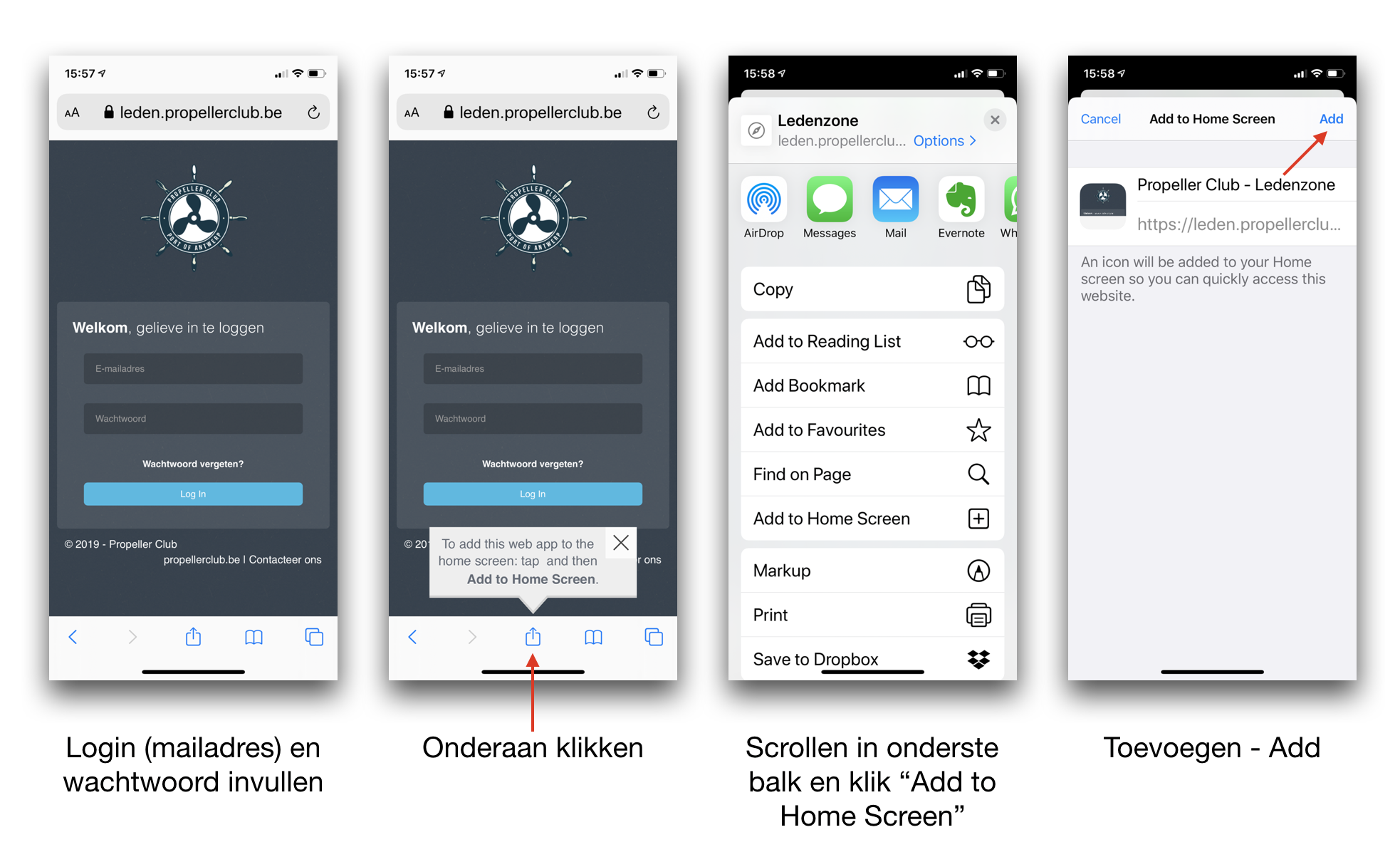
Apple

To install:

  • Surf on your iPhone or iPad to your klubs website
  • Login with your mail address and password
  • Click on the share icon
  • Scroll in this new window
  • Click "Add to Home Screen" - "Add to Home Screen"
  • Click on "Add

And voilà, the Klubs App added to your iPhone or iPad

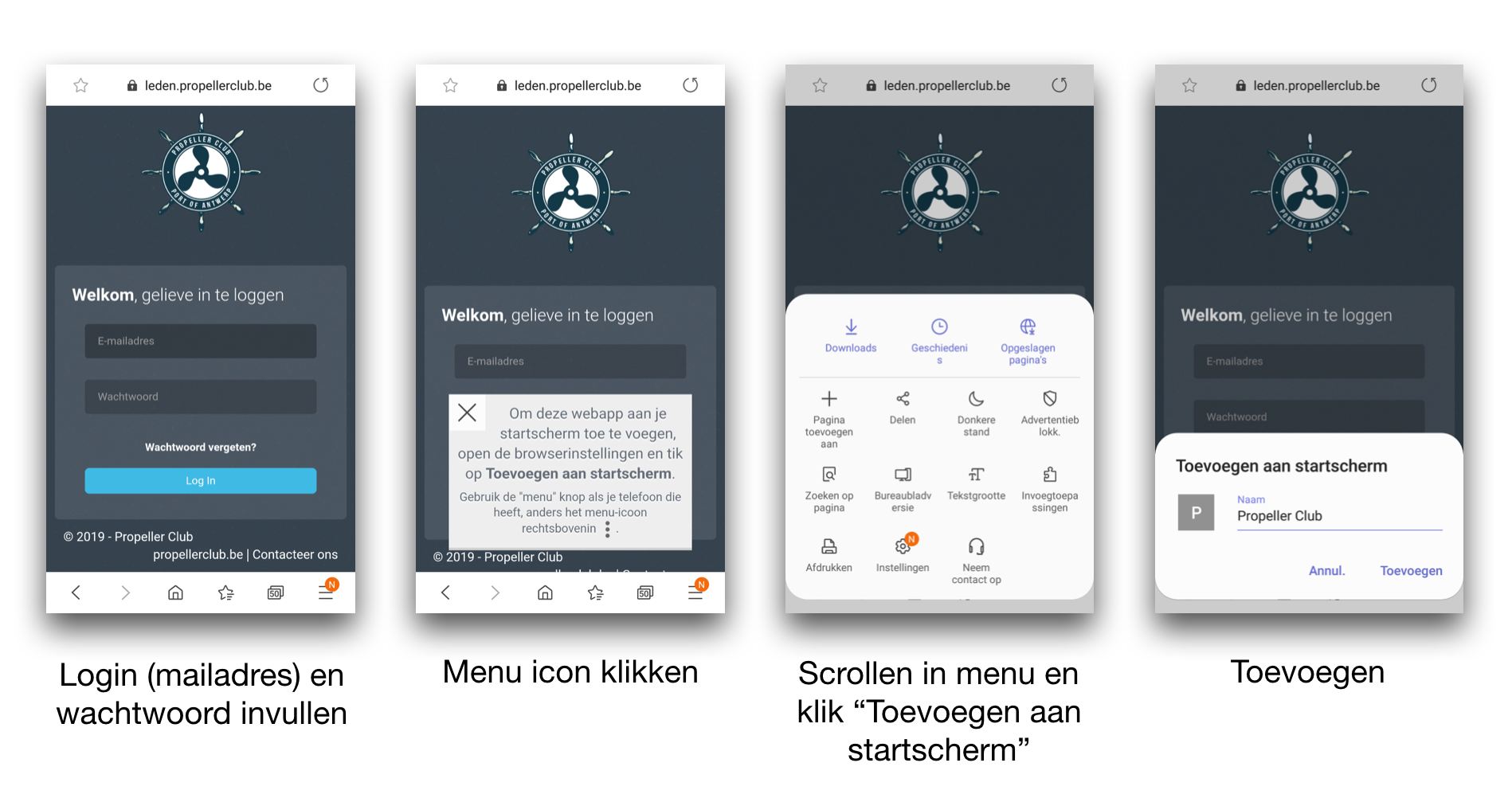
Android

To install:

  • Surf on your Android Smartphone or Tablet to your klubs website
  • Login with your mail address and password
  • Menu icon click (lower right or upper right)
  • Scroll down the menu
  • Click "Add to home screen" - "+ Add page" - Home screen
  • Click on "Add

And voilà, the Klubs App added on your Android Smartphone or Tablet

Read more