

Within Klubs we use a text editor for inserting text, images and especially for formatting.
See the bottom of this Knowledge Item for the specific HTML Format option.
Text Format

Features
The editor includes the following functions, some specific ones of which we will discuss in further detail:
Heading- Bold - Italic - Underline - Striketrough - Font size - Text color - Ordered list - Unordered list (bullets) - Block Quote - Table - Link - Image - Horizontal line - Indent - Outdent - Alignment - -HTML
Text Copy
Optimal is to just type and format text. Copying text, for example from a word document or a website can also be done, but can cause problems.
This copied text usually contains control characters that can sometimes be misinterpreted in the editor and cause special effects.
Copied text is best formatted as clean text first, without the possible control characters.
- via clean copy in the editor: Ctrl+Shift+V (PC) or Command+Option+Shift+V (Mac)
- via Notepad (PC) and then Paste and Match Style
- via TextEdit (Mac) and then Paste and Match Style
- via an online tool - http://www.textcleanr.com

Table ⊞
Formatting a usable table in an editor requires some knowledge of html.
For this we refer to a good tutorial - https://www.w3schools.com/html/html_tables.asp
Link 🔗
A link allows you to link external links in your text.

Links from your text to websites or to a mail address (this then opens in the user's default mail application.
This formatting can be made simple or complex, as with the mail, automatically a subject a body text a cc address, ... But also here some knowledge of html is needed. We refer here to:
- Web link: https://www.w3schools.com/html/html_links.asp
- Mail address: https://mailtolink.me
(for example: mailto:support@klubs.be?cc=admin@klubs.be&subject=Release%20note&body=This%20is%20a%20mail%20link%20with%20a%20formatted%20CC%2C%20subject%20and%20body.%0D%0A-%20with%20a%20bullet%0D%0A-%20and%20an%20other%20bullet%0D%0A
Image 🏔
Adding an image is done through the editor - Insert Image.
Through Upload Image you can retrieve an image from your desktop and insert it.

Image With
Image With for mailings to edit to 600 pixels
Click on the image to display the Image Edit.
- All images are loaded in full size
- Through the Image edit you can change the dimensions
- Optimal for mailings - With 600
(the height then changes accordingly)
Image Resolution
Image Resolution for mailings editable to 72 dpi
A simple image tool is probably needed for this.
Horizontal Line -
This is a simple, but convenient formatting to split a text smoothly
HTML editor 🛡
Within the text editor, this button allows you to perform a basic HTML review directly in the editor.
For a basic understanding of HTML – w3school.
HTML Format
Optionally, you can format an email entirely in HTML.

With expanded design options, such as visual identity and branding, improved structure and layout, higher conversion rates,
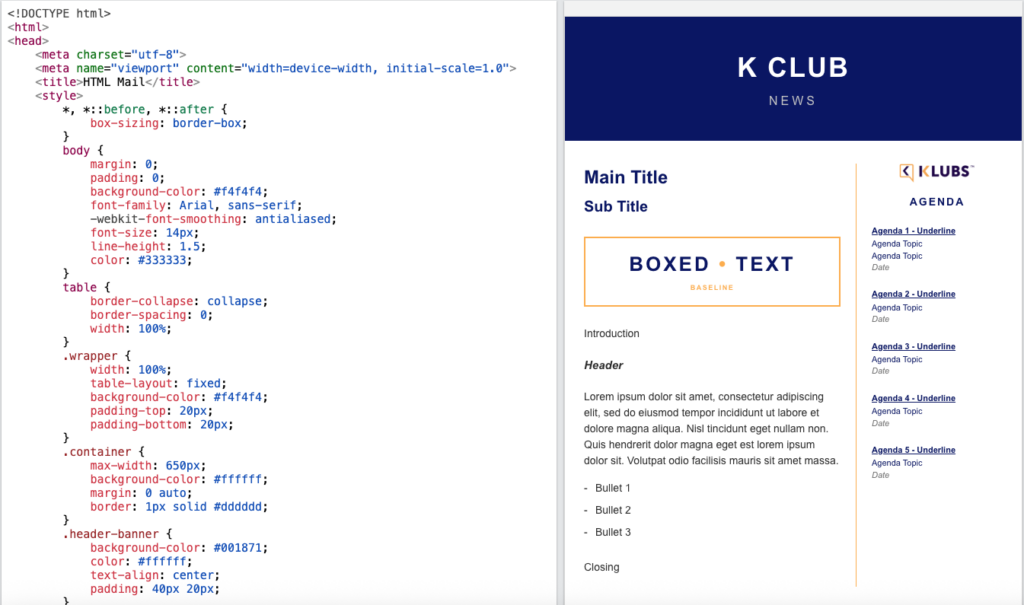
Tools that can help you with this:
- Litmus
- AI: Claude, Gemini, ChatGPT
However, caution is advised. If an HTML email is not formatted correctly, there is a risk that it will end up in the spam folder or appear unreadable to the recipient:
- Spam
Email providers (such as Gmail, Outlook, and Yahoo) strictly scan HTML code. - The Image-to-Text Ratio
Not just one large image with text hidden behind it - Bad code = Spam
Sloppy HTML and broken tags immediately trigger the spam filters - MS Word copy
Copying code directly from Microsoft Word = spam - Gmail – Outlook
What looks great in Gmail can fall apart completely in the recipient’s Outlook client - 1999-style code
Code as if it were 1999: tables, inline CSS, … - Plain text version
Always include an automatic plain text version with your HTML campaign
Testing Send test emails to various devices (iPhone, Android) and email clients (Outlook, Gmail).